


Word Crush® - Fun Puzzle Game
4.741.45K Reviews
App Specs
- Version
- 4.1.8
- Updated On
- License
- Free
- Downloads
- 10,000,000+
- Developer
- FUNJOY
- Categories
- Word
- Platform
- Android, iOS
Screenshots
 Analysis by AppCompare
I like word games that give me a clear way into the puzzle instead of making me learn a stack of rules first. Word Crush® - Fun Puzzle Game is built around finding words in a letter grid, so the first useful moment arrives quickly: spot a word, trace it, and see the board respond. That straightforward start makes it an easy choice when I want a small mental task between other things, rather than a game that demands a long session or a lot of planning.
What the first session feels like
The basic idea is familiar if you have played a word search, but the directions matter. Words may run horizontally, vertically, diagonally, or backwards, so I get more out of a board when I scan it in a deliberate pattern rather than darting around at random. I usually check the obvious rows first, then look for diagonals and reversed spellings. That simple routine helps me settle in and makes the first completed word feel earned, even when I am playing casually.
The game is a free word title from FUNJOY, and its age rating is Everyone. It has a 4.7 average from around 241,000 ratings, with over 10 million installs. Those figures suggest that the format has found a broad audience, but they do not tell me whether it suits every player. The useful question is whether you enjoy searching letters at your own pace; if you prefer elaborate story progression, a competitive strategy game, or a strict vocabulary lesson, this is a different kind of experience.
Getting started without overthinking it
When I open it, I can focus on the board rather than deciphering a complicated interface. The colorful presentation and mellow soundtrack give the game a relaxed feel, and the word-search format is understandable without a lengthy tutorial. For a first-time player, I would begin by taking the theme as a clue, not as a guarantee that every answer will jump out immediately. A theme narrows the kind of words I expect, while the grid still asks me to examine the letter paths carefully.
One practical tip is to avoid swiping every promising sequence at once. I first look for a likely starting letter, trace a complete word in my head, and only then make the swipe. This reduces false starts and helps me notice how the game treats diagonal and backward words. If I get stuck, the hint system can provide a nudge, but I save it until I have genuinely scanned the board; using help too early can turn a satisfying search into a sequence of taps.
From first find to a comfortable routine
The most reassuring first success is not finishing a long run of levels; it is finding one word, understanding why it fits, and knowing what to look for next. After that, I can decide whether I want another board or would rather put the phone down. The short-session appeal is real, though the “one more” pull can make a quick break stretch longer than intended. I would set a natural stopping point before opening the game if I need to return to work or another task promptly.
The Gameplay: Simple Yet Addictive
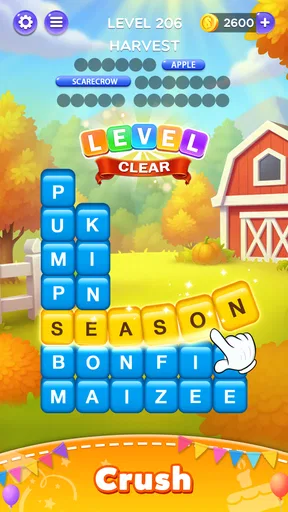
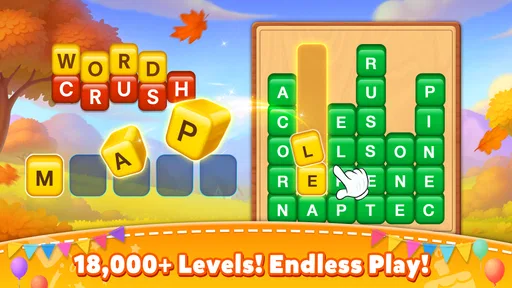
So, what’s the deal with the gameplay? Well, think of it as a fun twist on traditional word searches. You’re presented with a grid of letters, and your mission, should you choose to accept it, is to find and swipe words hidden within. The catch? Words can be horizontal, vertical, diagonal, and even backwards. Oh, and they throw in some tricky themes to keep you on your toes!
Worth Reading Before You Choose

Flipboard Shows What News Apps Must Do Beyond the Feed

Switching to Android Auto Means Rethinking Your Driving Routine

Google Calendar Makes a Crowded Week Easier to Manage

Ludo King Makes the Most of the Minutes Between Plans

Baby Panda World Brings Quick Play to Modern Phones, but Its Game Library Feels Busy

ESPN’s Live Game View Makes Following Close Games Easier
As you progress, the difficulty ramps up, but it’s never too overwhelming. It’s like the game knows when to challenge you and when to give you a breather. I found myself saying, "Just one more level," more times than I’d like to admit. It’s that kind of addictive where you’re having so much fun, you lose track of time.
Features That Stand Out
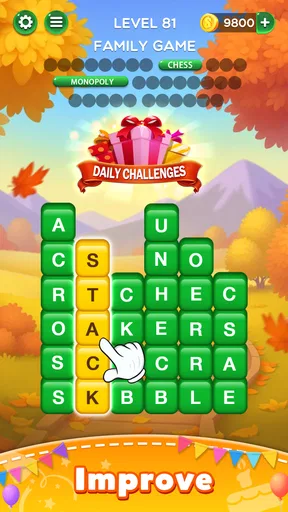
One of the coolest features is the daily challenge. It’s a neat little addition that keeps things fresh. Plus, completing these challenges nets you extra rewards, so it's a win-win. There's also this nifty hint system that’s a lifesaver when you’re stuck. Just a tap, and you get a helpful nudge in the right direction.
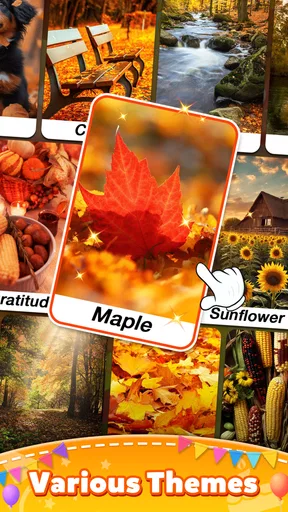
Another thing I love is the variety of themes. From animals to food, each theme brings its own unique flair to the puzzles. It’s a clever way to keep the experience exciting and diverse.
A puzzle for spare moments, not every mood
For an everyday example, I would choose a single board while waiting for a drink or sitting through a short pause in the day. The theme gives me a quick mental starting point, and the grid keeps my attention without requiring me to remember a plot or coordinate with other players. A longer quiet evening works too, especially if I want something more engaging than scrolling but less demanding than a timed challenge. The trade-off is that the same swipe-and-search rhythm can feel repetitive if I play for a long stretch.
Compared with a crossword, this asks less of me in terms of clues and word definitions; I am locating paths through letters rather than solving a verbal riddle. Compared with a conventional word-search book, the phone format gives me a more animated, guided session and the added routine of daily challenges. If I want to practise spelling with explicit explanations, build vocabulary systematically, or work through cryptic clues, I would choose a dedicated learning app or a crossword instead. Word Crush is strongest when the goal is light pattern-spotting and a satisfying small win.
The daily challenge is useful when I want a reason to return without committing to a long run of ordinary boards. I treat it as an optional change of pace, not a requirement: if I miss a day, I do not need to turn a relaxing game into another obligation. Themes also help me adjust my search strategy. With a familiar subject, I can think of likely words before scanning; with a less familiar one, I slow down and rely more on letter patterns. That makes the theme more than decoration, even though it does not remove the need to inspect the grid.
Hints are best used as a last nudge, not a default button. When I cannot see a word, I pause, look for a different starting letter, and check the directions I tend to neglect. Only then do I use help. This keeps the puzzle rewarding while still offering a way past a frustrating stall. Players who want every answer explained or who dislike getting any assistance may find the hint approach too hands-on; players who simply want to keep moving can use it to avoid abandoning a board.
Features That Stand Out
One of the coolest features is the daily challenge. It’s a neat little addition that keeps things fresh. Plus, completing these challenges nets you extra rewards, so it's a win-win. There's also this nifty hint system that’s a lifesaver when you’re stuck. Just a tap, and you get a helpful nudge in the right direction.
Another thing I love is the variety of themes. From animals to food, each theme brings its own unique flair to the puzzles. It’s a clever way to keep the experience exciting and diverse.
Community and Social Features
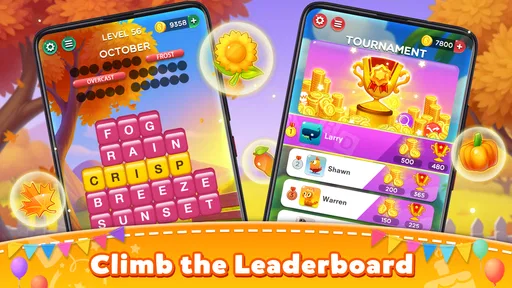
The social aspect of Word Crush® is surprisingly fun. You can connect with friends, compare scores, and even compete against each other. It’s a great way to bring a little friendly competition into the mix. Plus, the leaderboard feature lets you see how you stack up against players worldwide. It’s both humbling and motivating!
I see the social side as an optional extra rather than the reason to install. Comparing scores can give friends a light contest, while a worldwide leaderboard is more of a broad reference point than a measure of skill that I would take too seriously. If I prefer to play privately, the core word-search loop still makes sense on its own. On the other hand, anyone looking for deep team play or a rich multiplayer mode should be careful not to expect that from a game whose main appeal is finding words in a grid.
Visuals and Sound
Let’s talk visuals. The graphics are vibrant and crisp, making each session a visual treat. The animations are smooth, and the colors are easy on the eyes, which is great for those longer play sessions. The sound effects and music are spot on, enhancing the overall experience without being overpowering.
The relaxed presentation suits casual play, but I would still use the game in a way that fits the setting. In a quiet waiting room, for example, I can keep the phone muted and concentrate on the letters without relying on the soundtrack. At home, the gentle audio helps make a longer session feel more like a small break. The important point is that the puzzle itself carries the experience; sound adds atmosphere, but it is not what makes the search satisfying.
Useful details before you settle in
The game is free to download, with optional in-app purchases ranging from $0.49 to $99.99 per item. I would treat those as a separate choice from whether the word puzzles suit me: I can start with the free version and decide for myself whether anything beyond it matters. It is currently version 4.0.3, and it requires Android 7.0 or later. The game was released on January 23, 2019, so it is not a brand-new experiment; it has had time to build a substantial audience, though the experience still comes down to whether its particular style of word search holds my interest.
A common point of confusion is expecting the theme to tell me exactly where a word is hidden. It does not do the searching for me. I still need to trace letters in the right order, and a word that looks obvious across a row may turn out to bend along a diagonal or run backwards. When a swipe does not work, I check the direction and spelling before assuming I have misunderstood the game. That small reset is often enough to make the board click.
Another reasonable question is whether this is a good choice for a complete beginner. I think so if the player can comfortably read the words and use touch controls; the grid format is familiar, and the first successful find does not require learning a complicated system. It is less suitable for someone who wants a structured course with definitions, pronunciation, or lessons. I would also skip it if repeated searching through letter grids feels tedious, because the central activity stays recognizably the same even as themes and difficulty vary.
Final Thoughts
In conclusion, if you’re on the hunt for a puzzle game that’s both relaxing and challenging, Word Crush® is a fantastic choice. It's perfect for a quick session during a coffee break or a longer play when you’re in the mood to indulge. With its engaging gameplay, vibrant visuals, and fun social features, it’s a game that keeps you coming back for more.
So, why not give it a go? You might just find yourself, like me, pleasantly hooked on this charming word adventure. Happy crushing!
Pros
- Engaging word puzzles keep you entertained.
- Visually appealing with vibrant graphics.
- Regular updates with new challenging levels.
- Simple mechanics suitable for all ages.
- Offline play available for gaming on the go.
Cons
- In-app purchases can be expensive.
- Ads may interrupt gameplay frequently.
- Some levels feel repetitive over time.
- Requires a stable internet for updates.
- Limited social features for friend interaction.
FAQs for Word Crush® - Fun Puzzle Game
What is Word Crush® - Fun Puzzle Game?
Word Crush® is an engaging puzzle game designed to challenge your vocabulary and mental agility. Players swipe letters to form words and solve puzzles across various themes and difficulty levels. The game offers a blend of fun and learning, making it perfect for word enthusiasts.
Is Word Crush® available on both Android and iOS?
Yes, Word Crush® is available for download on both Android and iOS devices. You can easily find it on the Google Play Store for Android users and the Apple App Store for iOS users, ensuring accessibility to a wide range of mobile users.
Does Word Crush® require an internet connection?
Word Crush® can be played both online and offline. While an internet connection enhances the experience by enabling leaderboard access and updates, the core gameplay is fully functional offline, making it ideal for playing during travel or in areas with limited connectivity.
Are there in-app purchases in Word Crush®?
Word Crush® offers in-app purchases that allow players to buy hints and remove ads. While the game is free to download and enjoy, these optional purchases provide a smoother gaming experience and can help players progress through more challenging levels.
How does Word Crush® enhance vocabulary skills?
Word Crush® enhances vocabulary by presenting a variety of word puzzles that require players to think critically and creatively. With each level, players are exposed to new words and themes, encouraging learning and retention. This makes it a fun educational tool for all ages.


